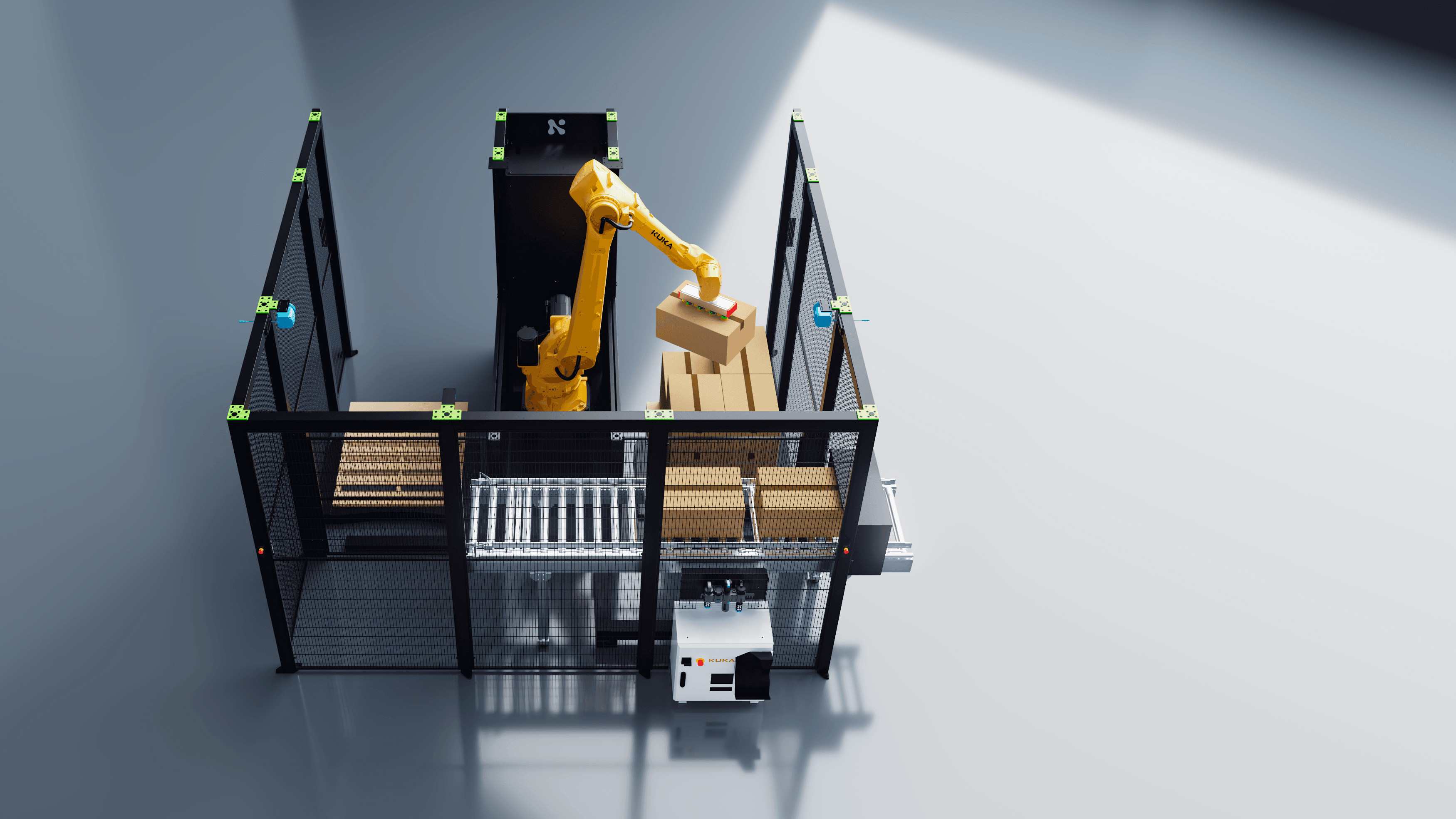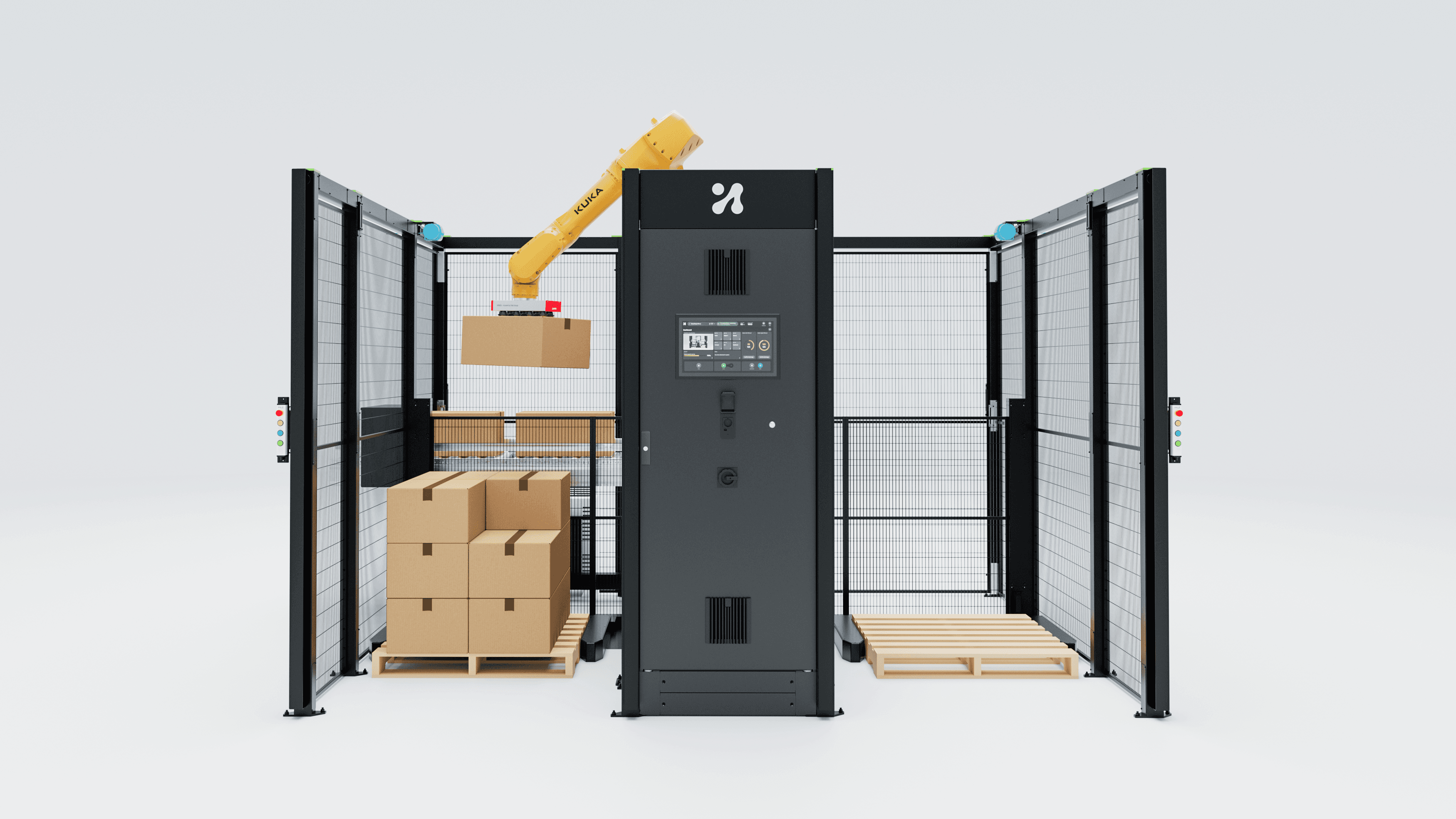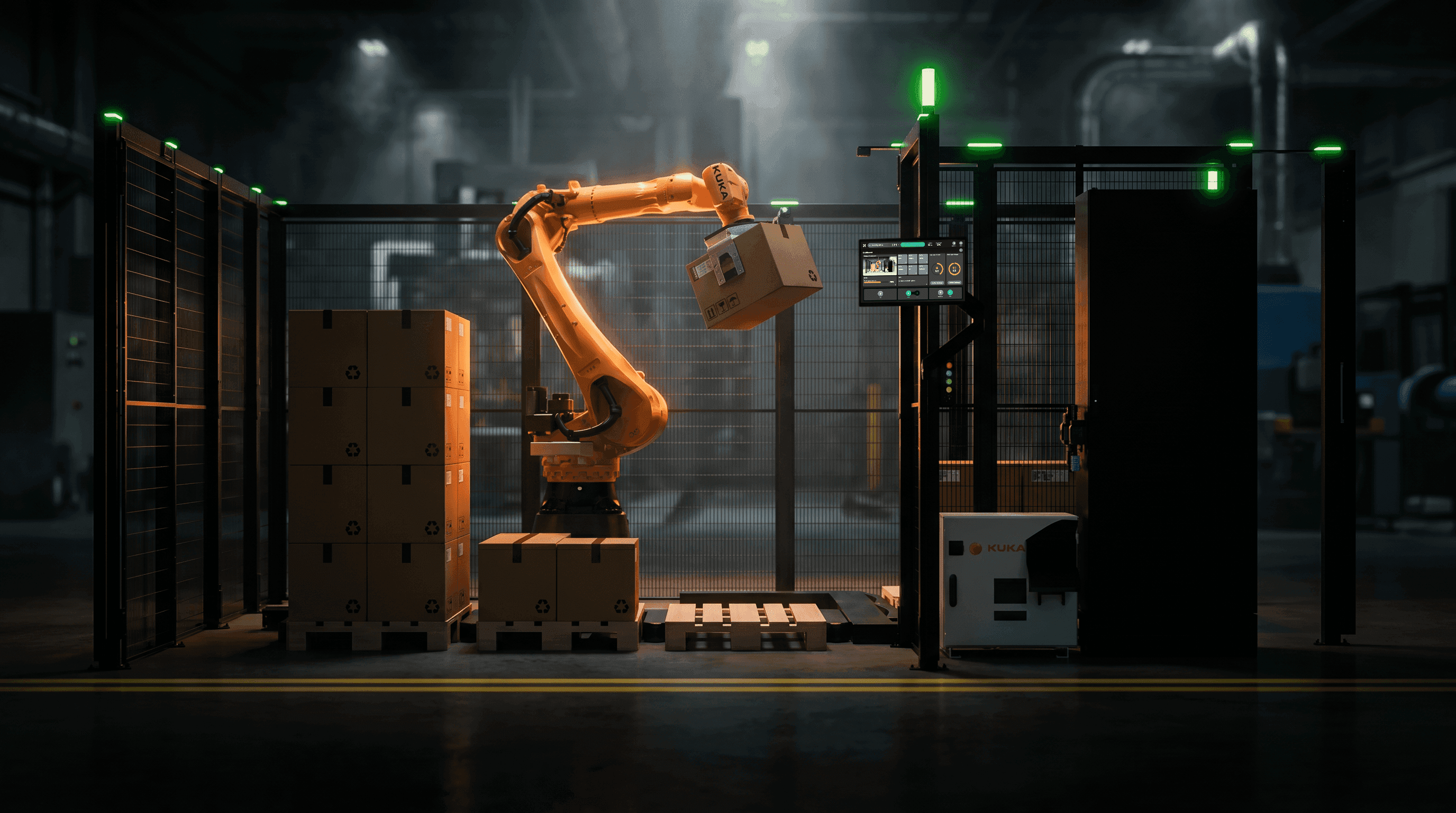

A working account of the generative tooling in my HMI pipeline: what it does for cell renders, motion and variants, and what it must never be allowed near.
The job is not screens.
People assume "HMI designer" means I draw screens. Screens are maybe a third of it.
What I actually ship for Unchained Robotics is the UX and UI for three separate interfaces, plus everything needed to make them understandable to someone who isn't sitting in front of them. One is the back-end engineering interface. One is where a cell gets configured. One is what the operator touches on the floor. Three audiences, three levels of consequence, one visual system.
Around that sits the rest of the output 3D animation showing how the MalocherBot cell behaves while somebody is driving it through the software. Trade fair visuals for All About Automation in Hamburg, Düsseldorf, Interpack, and Interzoo. Sales collateral. And the corporate identity that has to survive the trip from a dense engineering screen to a B2B conversation at a stand where a production manager has ninety seconds and a coffee.
Three constraints make this harder than it sounds. What I show usually doesn't exist yet in the configuration I am showing. The software changes weekly, sometimes between a render starting and finishing. And the person who has to understand the result has often never operated a robot, so every frame is doing explanatory work, not decorative work.
That is the brief that the tooling has to serve. Anything that does not serve it is a hobby.
The thing I have to show does not exist yet.
An HMI is unusual to photograph because the screen is meaningless without the machine.
A palletising screen showing a half-built pallet pattern is abstract nonsense on its own. Put it on a panel next to a robot lowering a case onto a layer, and it becomes obvious in two seconds. The interface only communicates in context, and the context is a working cell.
Filming that context is expensive when the cell exists and impossible when it does not. MalocherBot is modular and configured per customer, available in several palletiser sizes, supporting both cobots and industrial robots. There is no single cell to point a camera at. Where one exists, it belongs to a customer running production, behind a fence, lit badly, with a competitor's logo in shot.
So 3D and motion are not styling on top of the real work. They are the only honest way to show a configurable machine before it is built. That is why my pipeline is a 3D pipeline that also produces interface design, rather than an interface pipeline with some renders bolted on.
It also means every frame I make is a picture of a machine doing a thing, which a buyer reasonably reads as a statement that the machine can do it. Hold onto that.
The pipeline as it actually runs
Here is the sequence, stage by stage, with an honest label on each one.
Constraint gathering. Conversations with engineering about what the cell will actually do, what the gripper is, what the payload is, what the software will look like by the time this ships. Not generative. Not automatable. This is where the design decision lives.
Interface design in Figma. Tokens, component set, states, screen flows for all three interfaces. Partially agent-assisted now, heavily constrained.
Prototype and web in Framer. Interaction behaviour, timing, the marketing site, landing pages for a fair. Partially agent-driven, and this is the stage where MCP changed my week the most.
Scene built in Cinema 4D 2025/2026 with Redshift. CAD from the robot manufacturers comes in, gets cleaned up and retopologised where it is too heavy, gets materials, gets rigged for the motion I need. Not generative. A KUKA arm has joint limits, and I model to them.
Screen content onto panel geometry. The actual Figma screens, exported at the panel's real resolution, projected onto the HMI panel in the scene, with the right glare and the right viewing angle. Not generative, ever. The screen in the render is the screen from the design file.
Animation and camera. Robot motion, conveyor, gripper actuation, camera moves that follow the operator's attention rather than showing off. Exploration here is now partly generative. Final timing is not.
Render passes out of Redshift. Beauty, object ID, depth, shadow, reflection. Split into layers so compositing has something to work with.
Compositing in After Effects. Background replacement, shadow work, screen inserts and screen state changes, grade, text overlays, fair-specific crops. Mixed. Some of it is now agent-driven, some is generative, and most is still hand work.
Image compositing in Adobe Firefly. Background plates, silhouette-masked composites, texture variation, plate extension when a fair panel needs a different aspect ratio than I rendered. Generative and tightly bounded.
Export and versioning. One animation becomes a fair loop, a sales deck sequence, web hero videos and stills: automation, not generation.
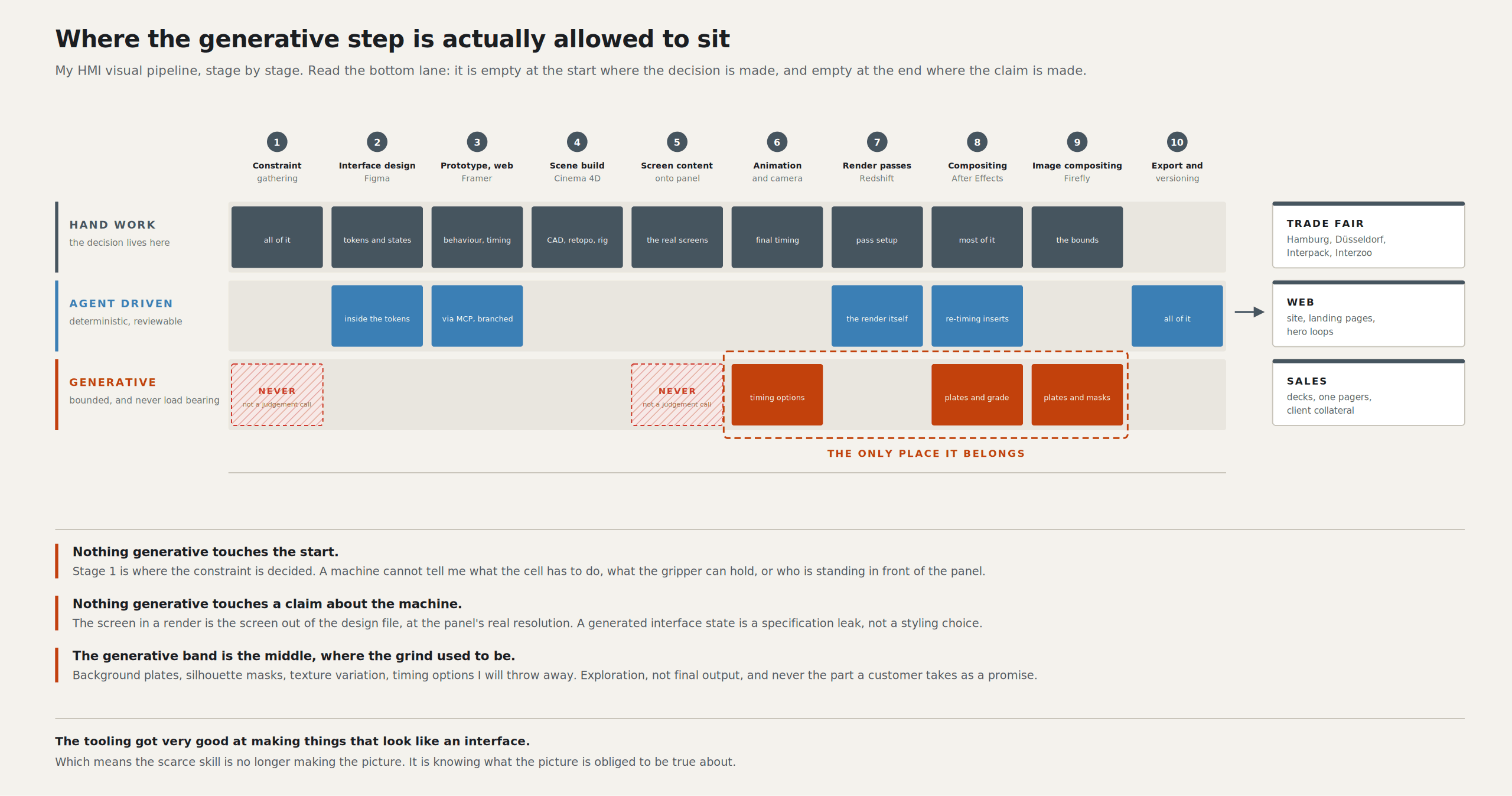
Look at where the generative band actually falls in that diagram. Not at the start, where the decision is. Not at the end, where the claim is made. In the middle, where the grind used to be.
Agents inside the tool, not pictures from a chatbot
The most useful AI in my pipeline does not produce a single pixel. It operates software I already own.
After Effects has become scriptable by an agent through an MCP server that talks to the application over an ExtendScript bridge panel, the panel polls for commands and executes them inside After Effects' own scripting environment, so the agent can create compositions, add text, shape and solid layers, set keyframes on position, scale, rotation and opacity, apply expressions, create masks with feather and expansion, and batch property changes across many layers at once (after-effects-mcp).
That list sounds dry. In practice, it is the difference between an afternoon and ten minutes.
A concrete case. A MalocherBot animation needs the operator screen to change state eleven times across forty seconds, each change timed to a physical event: gripper closes, case lifts, layer completes, pallet ready. Eleven inserts, each corner-pinned to the same panel geometry, each of which moves when engineering revises the sequence. Doing it by hand is fine once. It is miserable on the fourth revision. Handing an agent the event list and letting it re-time the inserts against my existing precomps is deterministic, reviewable, and doesn't invent anything. The imagery is still mine.
Framer works the same way from the other direction. Framer now exposes external agent access to a project, so a client like Claude Code can work on the canvas and components, read and write CMS collections, and publish, with every agent change landing on a separate branch for review and merge rather than straight onto the live site (Framer).
Branching is what makes it usable professionally. An agent restructuring a responsive layout across five breakpoints is genuinely helpful and occasionally wrong. On a branch, wrong costs me a diff review. On the live site, wrong costs a customer seeing a broken product page during a fair week.
This is the shape of AI that has actually earned a permanent place in my work: an agent holding the controls of a deterministic tool, working on my assets, with a review gate. Not a prompt box producing a picture that looks like my work.
Where the generative step earns its place
Generative image and video tools do have a real seat at this table. The seat is narrower than the marketing suggests, and it is in the middle of the pipeline.
Background and environment plates. A cell render needs a factory hall behind it. That hall is not the product. Nobody is buying it, validating it, or operating it. Generating a plausible industrial interior, grading it to match my Redshift lighting, and compositing the cell into it with matched shadow work is faster than shooting it and more controllable than stock. This is the single biggest time-saving in my whole pipeline.
Silhouette masking and compositing. Firefly's masking workflows handle the moderately tedious cases well: a clean product silhouette against a busy plate, a cable that needs to come forward of a background element, a set of stills that all need the same treatment. I still roto anything with motion blur or a gripper finger crossing a reflective surface by hand, because generated mattes go soft exactly where the detail matters.
Texture and material variation. Scuffed anodised aluminium, worn powder coat, epoxy floor with the right amount of tyre marking. Twenty variants in the time it used to take to build two; then I pick one and rebuild it properly as a Redshift material.
Motion exploration. When I need to know how a camera move should feel across a forty-second sequence, I want twenty timing options and will keep one. Generating rough motion studies, then animating the chosen one properly, beats hand-animating three options and settling.
Copy variants under a hard character budget. Operator button labels, alarm text, fair panel headlines that have to work in German and English at the same width. Thirty options against a 24-character ceiling, then I choose. Language generation is genuinely good at this narrow job.
First-pass layout exploration and asset cleanup. Rough screen arrangements to argue against. Upscales. Plate extension when the stand panel is 3:1 and I rendered 16:9.
The honest framing is that none of this saves time on final output. It saves time on exploration. What I ship is still built by hand, because the generated version never survives contact with a real constraint: the actual panel resolution, the actual robot geometry, the actual state list. What changed is that I now arrive at the build stage having looked at twenty options instead of three.
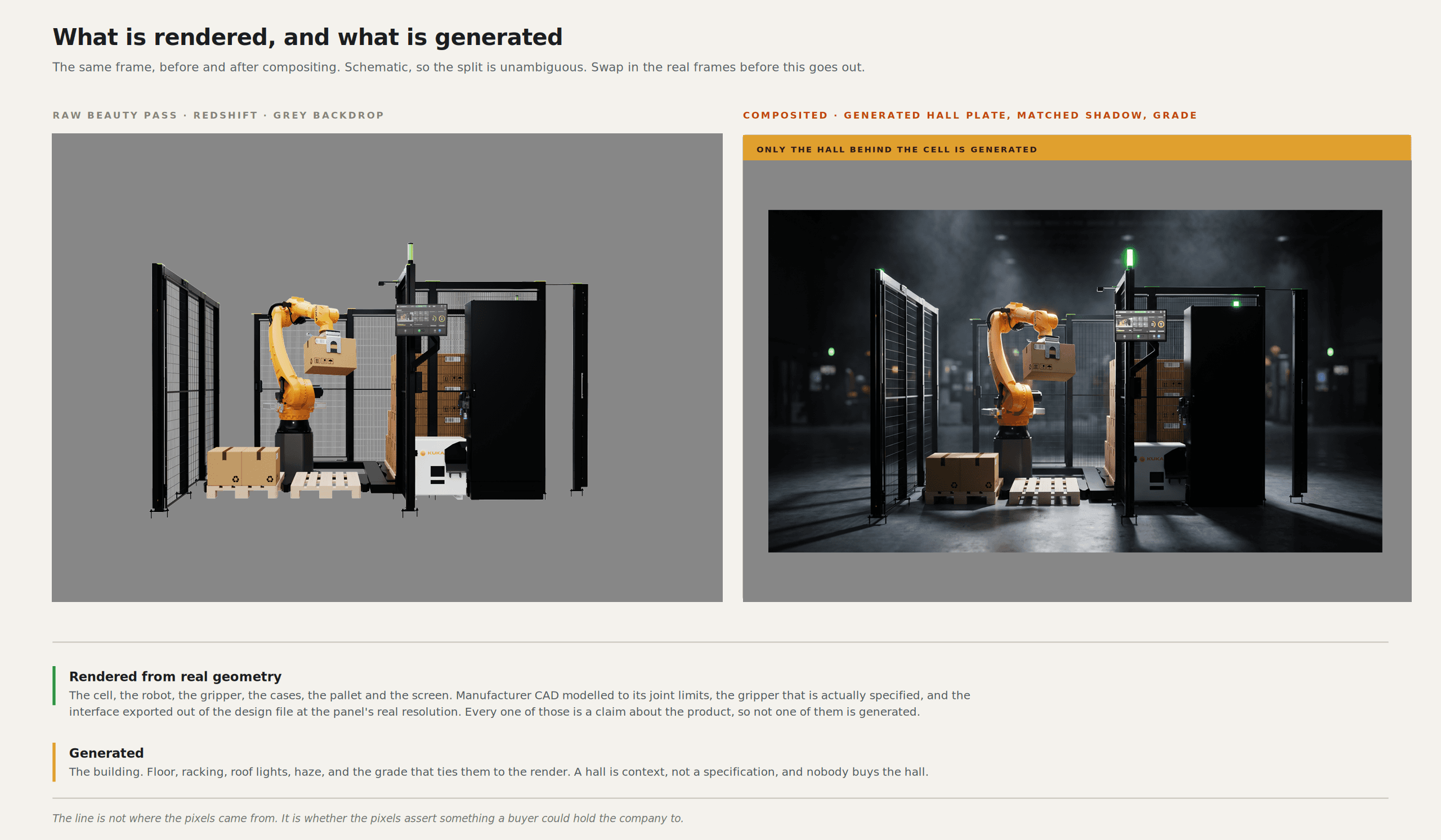
The line: a picture of an HMI is a claim about a machine
Everything above is comfortable. This part is not, and it's why I am writing the article.
Nothing generative touches anything that has to be validated. That rule has no exceptions and no "just for the pitch deck" carve-out.
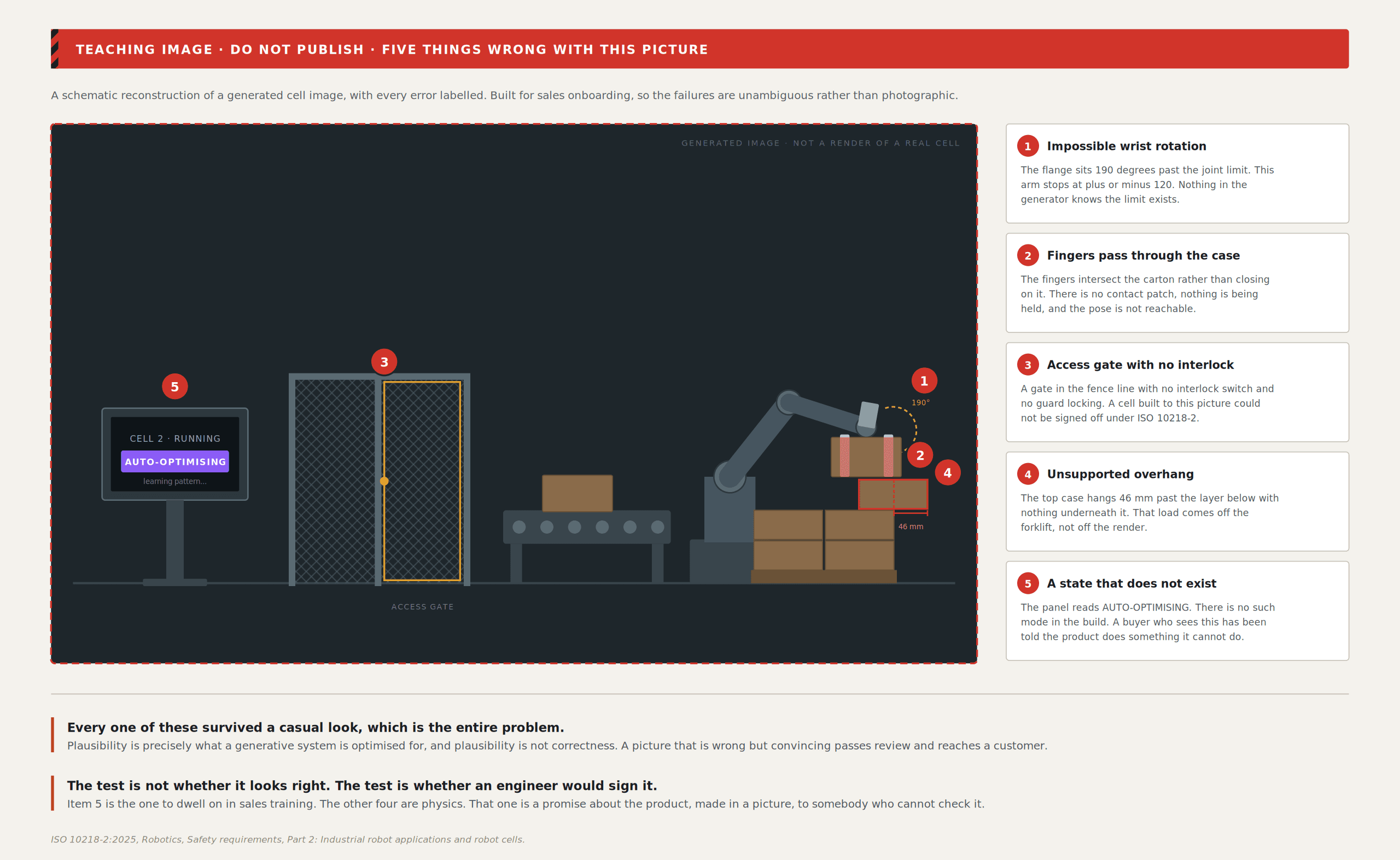
The list of things I will not generate is specific: an interface state that does not exist in the build, a robot pose that is kinematically impossible for the arm named in the caption, a gripper holding a payload it cannot hold, any safety indication or e-stop state, any cycle time or throughput figure rendered as screen content, and any pallet pattern that would not actually stand up.
That last one is worth dwelling on. Mixed-case palletising systems compute patterns for stability and cycle time together, with 3D vision dynamically balancing loads, building stacks up to six feet high at 300 to 1,000 cases per hour (Photoneo). A generative model asked for "a neat pallet of mixed cases" gives me something that reads as neat and would topple in transit. It looks right. It is wrong in a way only a warehouse manager notices, at exactly the wrong moment more on that gap in AI in palletising.
The deeper problem is what an image of an interface is. When I put an operator screen in a render, I'm stating that the product has that screen, in that state, with those controls, reporting that value. A sales engineer shows it. A customer remembers it. Somebody in procurement screenshots it into a requirements document. In a regulated industrial context, that is not a stylistic decision; it is a specification leak.
A generated image of an HMI is not an illustration. It is a claim about a machine, made in a picture, to a buyer who cannot check it.
The standards moved in the same direction, which is worth noticing. ISO 10218-1:2025 and ISO 10218-2:2025 were published in March 2025 after nearly eight years of work with experts from over twenty countries, folding the old ISO/TS 15066 content into the two parts. Hence, the technical specification no longer stands alone. The terminology changed with it: "collaborative robot" and "collaborative operation" became "collaborative application", because only the actual application, with its real workpieces, task programs and supporting machinery, can be validated as collaborative. "Safety-rated monitored stop" became "monitored standstill" (Automate).
Read that as a designer, and it is pointed. The standard's own position is that you cannot make a safety claim about a component in isolation, only about the validated application in front of you. A render of a person standing next to a moving arm is a claim about an application that has not been validated. So I do not make that render unless engineering has told me the configuration and I have modelled it to the real geometry.
Then there is the failure mode underneath all of this. Generative systems are optimised for plausibility. In most creative work that is fine, because plausible is the goal. In industrial visuals, plausible-but-wrong is the worst possible output, because plausible is exactly what gets a thing through review. Obviously broken images get caught. A gripper with the wrong number of fingers gets caught. A perfectly lit, perfectly composed frame showing a 12 kg payload on an arm rated for 7 kg sails through three approvals and ends up on a stand in Düsseldorf. I have written about what that does to the discipline and how HMI design changed after AI.
What actually changed in 2026, rated honestly
Config 2026 landed a lot at once, and most coverage did not ask whether any of it helps industrial interface work. Here is my assessment, with ratings.
Figma Motion. 9/10 for HMI. Native animation timelines on the canvas, keyframes for position, scale, rotation and opacity, auto-keyframing, animated components shared across files, export to MP4, GIF, SVG and WEBM, and code out as CSS, JSON, React or motion.dev (Config 2026 recap). This matters most. HMI motion is small, functional and repetitive: state transitions, acknowledgement feedback, progress that has to be read from two metres away with gloves on. That motion has to be specified to developers, not just shown. A timeline in the same file as the component, with motion.dev or CSS coming out the other end, closes the gap between my intention and the build. Animated components across files stop the operator transition set from being twenty drifting prototypes.
Code layers. 7/10, with a caveat. Importing a GitHub repo onto the canvas as editable layers with bidirectional sync is genuinely useful on the operator side, where the built component is the source of truth and my file lags behind. The caveat is the second writable source of truth. In a codebase where interface components carry safety-relevant states, I want the sync running one direction only, into the design file. I use it to read, not to write back.
WebGPU shaders. 3/10 for HMI, 8/10 for everything else I make. Shader effects and fills, authorable through the design agent and keyframeable on the motion timeline, are excellent for fair graphics and web. On an operator panel, they are close to useless. Panel hardware is not a MacBook display, the operator is wearing gloves, the hall lighting is bad, and legibility beats atmosphere every time. An HMI that needs a gradient shader to be interesting has a content problem. That is an unpopular position, and I will keep holding it.
The design agent is getting custom skills as slash commands, file attachments and MCP connectors. 9/10, and underrated. Everyone reads this as convenience. It is actually the constraint-delivery mechanism. I can attach the HMI philosophy document, the token list and the state matrix, and write a slash command that encodes how an operator screen is allowed to be assembled. The agent stops guessing at house style and starts executing a written rule set. That is worth more to me than anything in the shader release.
Generative plugins from a prompt. 6/10, useful in a narrow way. The plugins I have built this way are boring, and I use them constantly: check every text layer against its character budget, flag any use of the alarm colour outside an alarm component, list screens missing a defined error state.
Constraint is what makes any of this safe.
Here is the thing that separates a generative step that produces useful work from one that produces slop: the size of the vocabulary you hand it.
Give an agent a blank canvas and an open colour picker, and it produces something that looks like an interface and means nothing. Give it eleven colour tokens, one of them reserved for alarms and illegal anywhere else, four type sizes, a spacing scale, a component set where every component has an enumerated state list, and a written document saying what this HMI is for and who operates it, and the same agent produces thirty consistent screens a developer can build.
The vocabulary is the product. The generation is downstream of it.
This is not a new idea, and it does not come from software design. ISA-101.01-2015, "Human Machine Interfaces for Process Automation Systems", is built around exactly this: an HMI philosophy document, a consistent display hierarchy, human-centred design, and a lifecycle running through design, implementation, operation and continuous improvement, with supporting technical reports on HMI philosophy and on usability and performance (ISA). Process industries worked out decades ago that consistency across displays was a safety property, not an aesthetic one.
What changed is how much that document is now worth. A written philosophy used to be a thing a team ignored after month three. Now it is a file I attach to an agent, and the agent does not get bored of it. Writing the constraint down has gone from good practice to the thing that directly determines output quality.
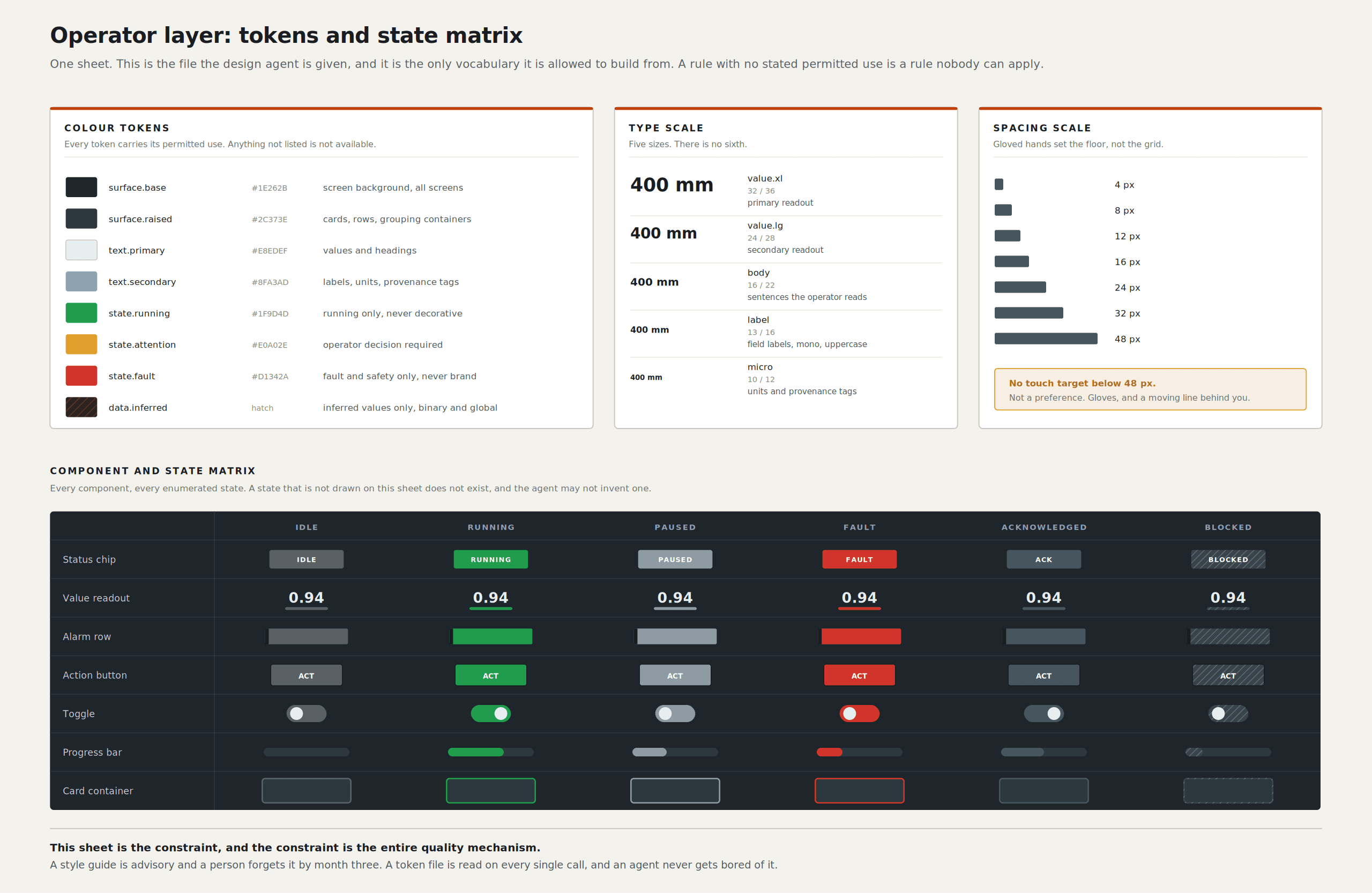
The logic runs the other way too. An agent constrained by a good system produces good work. An agent constrained by a bad system produces bad work faster than any human could. Someone still has to know which system is good, and that judgement is not automatable. I argue that case at length in taste and perception, and on the heuristics side in making automation heuristics legible.
The cheap middle has a bill attached.
Let me be specific about what this tooling replaced in my practice, because vague productivity claims are how this subject usually gets discussed.
It replaced: hunting for stock plates that never matched my lighting, painting backgrounds by hand, rotoscoping simple silhouettes, building the twentieth variant of a composition manually, re-cutting fair assets to a new aspect ratio, and most first-pass layout thrash. Real work, genuinely gone.
It did not replace: deciding what to show, knowing which forty seconds of a two-minute cell cycle a buyer needs to see, modelling a robot to its real joint limits, working out why an operator keeps missing the acknowledgement button, or the conversations with engineering that produce the constraint. It made none of those faster. If anything, it made them a larger share of the job, which is the good outcome.
And there is a trap in it. When the middle of the pipeline gets cheap, the default response is to make more variants, not to test the ones you have. I now produce more options per project than I did five years ago. That is only an improvement if the time saved goes back into validation: sitting with an operator, watching someone use the operator screen with gloves on, finding out that the state I was so pleased with reads as "broken" to the person who has to work a shift next to it.
If the saved time goes into volume instead, net quality goes down. More polished, more plausible, less true.
The industry context makes this urgent, not academic. The industrial robot installation market reached an all-time high value of US$16.7 billion, and the IFR's trends for 2026 put AI and autonomy first, safety and security fourth, and robots as allies for labour gaps fifth, with that last one explicitly conditional on close cooperation with employees (IFR). Every cell sold is another group of people who did not choose this software and have to use it anyway. The number of operators is rising faster than the number of designers who have ever watched one work.
So the saved time has a designated destination. It goes into hours nobody can generate: watching a real person fail at the thing you assumed was obvious.
The tools got very good, very quickly, at making something look like an interface. That is now a solved problem, and it is worth close to nothing on its own. What did not get easier, what got harder if anything, is knowing what an interface has to be true about before anyone is allowed to see it.
Sources
International Federation of Robotics, Top 5 Global Robotics Trends 2026
Automate.org, Updated ISO 10218 FAQ (ISO 10218-1:2025 and ISO 10218-2:2025)
ExplainX, Figma Config 2026 complete recap: Motion, Code, Shaders, AI
Framer, Connect Claude, Cursor, Codex and other agents to Framer
Leon Potgieter designs HMI and visual systems for industrial robotics. He has spent the last five years as the visual systems designer for Unchained Robotics in Germany, working on the operator, configuration and engineering interfaces behind the MalocherBot cell.