
The EU Machinery Regulation applies on 20 January 2027. Several of its requirements end on a screen. Here is what HMI teams should fix now.
On 20 January 2027 the EU Machinery Regulation (EU) 2023/1230 applies on a mandatory basis. Most of the conversation around it lives in engineering and compliance departments: conformity assessment, notified bodies, technical files. That is understandable. It is also a blind spot.
After five years designing HMI software, 3D cell animations and trade-fair visuals in robotics, my read is simple. Several of the new requirements do not end in a risk assessment spreadsheet. They end on a screen. If the operator cannot see it, find it or understand it, the requirement is only half met, and the design team is the one holding the other half.
This post covers what changed this summer, which clauses land directly on the HMI, and a checklist you can take into your next sprint.
July changed the map: machinery left the AI Act's direct scope
Until this summer, anyone building AI features into robot cells expected to track two rulebooks at once: the Machinery Regulation and the EU AI Act. That changed in July.
The Digital Omnibus on AI, Regulation (EU) 2026/1744, was published in the Official Journal on 24 July 2026 and entered into force on 27 July 2026. According to White & Case's analysis, it moves the deadline for high-risk AI systems embedded in regulated products (Annex I, which covers machinery) to 2 August 2028, and stand-alone Annex III systems to 2 December 2027. More important for our industry, it removes machinery products from the list requiring full high-risk AI compliance. In White & Case's words, the machinery products regulation "has been added to the group of regulations that require additional legislative projects to establish high-risk AI rules."
The omnibus also clarifies what counts as a "safety component": AI systems that only assist users or optimise performance are not automatically treated as safety components, provided their failure or malfunction does not create health or safety risks.
Here is my view, and it is only a view: do not read this as relief. It means the Machinery Regulation is now the primary legal frame for AI in a robot cell, and that frame already contains requirements aimed squarely at machines that learn. The AI Act's documentation-heavy approach is off the table for now. The Machinery Regulation's operator-facing approach is not.
Four places where the regulation lands on the screen
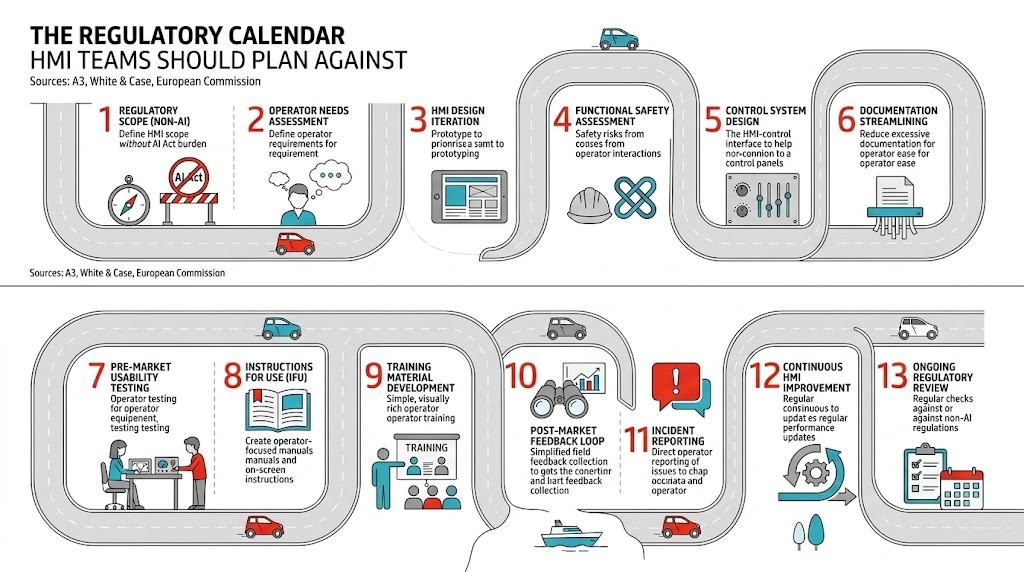
The Machinery Regulation replaces the Machinery Directive 2006/42/EC. Its essential health and safety requirements now sit in Annex III. Four areas matter directly to anyone who designs operator interfaces.
1. Ergonomics now covers machines with self-evolving behaviour
Clause 1.1.6 on ergonomics now also addresses machines that learn. As Rockwell Automation's guide to the regulation puts it, it "gives consideration to how operators interact with machinery or related products that have either fully or partially self-evolving behavior."
For decades, HMI ergonomics meant screen height, glove-friendly touch targets and readable alarm lists. Now the question also includes: when a cell adapts its own behaviour, can the operator follow what it is doing? That is an interaction design problem. It covers state visibility, how a changed behaviour is announced, and how a person on the floor tells the difference between "the system adapted" and "the system is faulty."
The regulation also takes machine learning in safety functions seriously enough to classify it as high risk. Annex I Part A lists "safety components with fully or partially self-evolving behaviour using machine learning approaches ensuring safety functions" and machinery with embedded systems of that kind. Those categories require third-party conformity assessment.
2. Software identity and tamper evidence must be readable
Clause 1.1.9, protection against corruption, is in effect the regulation's cybersecurity clause. As quoted in Rockwell Automation's guide, software and data critical for compliance "shall be identified as such and shall be adequately protected against accidental or intentional corruption." The machine "shall identify the software installed on it that is necessary for it to operate safely" and "be able to provide that information at all times in an easily accessible form." It "shall collect evidence of a legitimate or illegitimate intervention in the software."
Read those phrases again as a designer. "At all times in an easily accessible form" is a UI requirement. Somebody has to decide where the safety-relevant software versions live in the navigation, who can see them without a service login, and how an intervention log is presented so that a maintenance lead can actually use it. A buried diagnostics page three levels deep, readable only with a laptop, is a weak answer.
3. Control systems must withstand malicious attempts, and keep a record
Clause 1.2.1 on safety and reliability of control systems now expects control systems to withstand "reasonably foreseeable malicious attempts from third parties leading to a hazardous situation." For software-based safety systems ensuring safety functions, Rockwell's guide summarises that recording of data on the safety-related decision-making process must be enabled and retained for one year after the machinery is placed on the market or put into service.
Logging sounds like a back-end task. It becomes a front-end task the moment an incident happens and someone needs to reconstruct what the cell decided and why. If your HMI already surfaces decision events in a readable timeline, you are far ahead. If the only interface to that data is a raw export, plan the viewer now.
4. Instructions can go digital, with conditions
The regulation allows instructions for use in digital format; according to the Parliament's summary of the final act, digital becomes the default and paper remains an option for customers who request it. The Parliament's first-reading position, as summarised by its Legislative Observatory, set out that digital instructions should stay accessible online during the expected lifetime of the machinery and for at least 10 years after it is placed on the market, and that a paper version should be provided free of charge within one month if the user asks at the time of purchase. Check the final wording in the Official Journal text before you design around those numbers.
This is a design opportunity that most teams will waste by uploading the existing PDF. Instructions that live inside or next to the HMI can be contextual: the right procedure for the current alarm, the current mode, the current tool. The legal floor is availability. The design ceiling is usefulness at the moment of need.
Cybersecurity became an interaction design problem a week ago
The Cyber Resilience Act adds a parallel clock. Since 11 September 2026, manufacturers of products with digital elements must report actively exploited vulnerabilities and severe incidents. The European Commission sets out the sequence: an early warning within 24 hours, a full notification within 72 hours, and a final report no later than 14 days after a corrective or mitigating measure is available for an actively exploited vulnerability, or within one month for a severe incident. The Act's main obligations apply from 11 December 2027.
Standards moved in the same direction. The revised ISO 10218-1 and ISO 10218-2, announced by A3 in February 2025, added requirements on cybersecurity as it relates to industrial robot safety. They also integrated the collaborative robot guidance of ISO/TS 15066 into the main standard, made functional safety requirements explicit, and introduced new robot classifications.
Put these together and the operator interface picks up a set of jobs it did not have before:
telling the operator, in plain language, that a security update is pending and what it means for production;
showing which software version is running on safety-relevant components;
handling role-based access without slowing down a shift change;
recording who changed what, in a form a human can read.
Each of these is a trade-off between security and speed on the floor. Security that operators experience as friction gets worked around: shared passwords taped to the cabinet, service accounts left logged in. That is why I think these decisions belong in the design review, not only in the security review.
The HMI readiness checklist for January 2027
This is the checklist I would run with an HMI team before the application date. It does not replace a conformity assessment. It makes sure the interface can carry what the assessment requires.
Visibility
Can an operator see, from the main screen, whether the cell is in a normal, adapted, degraded or safe state?
When behaviour changes because of a learning or optimisation feature, is the change announced, and can it be distinguished from a fault?
Software identity
Is there a single, easy-to-reach screen listing safety-relevant software and versions, readable without special tools?
Is every intervention on that software (update, parameter change, rollback) logged and viewable with time, user and outcome?
Traceability
Can a maintenance lead reconstruct the last safety-relevant decisions of the system from the HMI, without a raw data export?
Is the retention period for decision data known, and does the interface say how far back the record goes?
Access and security
Are roles defined so that safety-relevant settings are protected, while routine shift work stays fast?
Is there a designed flow for security updates: notice, impact on production, scheduling, confirmation?
Instructions
Are digital instructions reachable from the HMI in context (alarm, mode, tool), not only as a document library?
Is there a plan for keeping them online for the full required period, including after a software redesign?
Score each item red, amber or green. In my experience, visibility and instructions are usually the easy wins. Traceability is where teams find they have the data but no interface for it.
Where this leaves designers
The regulation does not treat UX or interface design as a discipline. It does not need to. When a legal text asks for information "at all times in an easily accessible form," it is asking a design question and leaving the answer to whoever builds the screen.
My position is that HMI teams should stop waiting for compliance to hand them requirements in January. The clauses are public, the dates are fixed, and the interface is where most of them will be judged by the people who use the machine every day. Four months is enough time to fix visibility, software identity and instructions. It is not enough time to discover them in the week before a customer acceptance test.
Sources
European Commission, Machinery (Internal Market, Industry, Entrepreneurship and SMEs): https://single-market-economy.ec.europa.eu/sectors/mechanical-engineering/machinery_en
EU-OSHA, Regulation 2023/1230/EU machinery: https://osha.europa.eu/en/legislation/directive/regulation-20231230eu-machinery
Regulation (EU) 2023/1230, official text on EUR-Lex: https://eur-lex.europa.eu/eli/reg/2023/1230/oj
European Parliament Legislative Observatory, summary of first-reading position 2021/0105(COD) (digital instructions): https://oeil.europarl.europa.eu/oeil/en/document-summary?id=1741113
European Parliament Legislative Observatory, summary of final act (Annex I categories): https://oeil.europarl.europa.eu/oeil/en/document-summary?id=1749182
Rockwell Automation, A guide to the Machinery Regulation (EU) 2023/1230: https://literature.rockwellautomation.com/idc/groups/literature/documents/sp/oem-sp123_-en-p.pdf
White & Case, EU AI Omnibus enters into force, amending the AI Act: https://www.whitecase.com/insight-alert/eu-ai-omnibus-enters-force-amending-ai-act
European Commission, Safer and more secure digital products (CRA reporting): https://commission.europa.eu/news-and-media/news/safer-and-more-secure-digital-products-2026-09-11_en
A3, Updated ISO 10218: major advancements in industrial robot safety standards now available: https://www.automate.org/robotics/news/updated-iso-10218-major-advancements-in-industrial-robot-safety-standards-now-available