Typing "pick the small parts" into a robot is easy. Knowing what the robot understood is the hard part. Design the proof screen first.
Every robot vendor now wants you to talk to the machine. ABB's cobot trend piece from February put it plainly: "Gesture based teaching, drag and drop and no-code programming, lead-through learning, and natural language interaction now enable robots to see, listen, and respond." At GTC in March, NVIDIA announced that ABB Robotics, FANUC, KUKA and YASKAWA are integrating Omniverse libraries and Isaac simulation frameworks into their virtual commissioning solutions, and Jetson modules into their controllers for AI inference at the edge. The pieces for "describe the task, get a program" are being assembled across the industry.
I think the interaction design conversation is lagging behind the capability conversation. Most of the demos I see copy the consumer pattern: a text field, a send button, and a robot that starts doing something. That pattern works when the cost of a wrong answer is a bad paragraph. On a shop floor, a wrong answer is a trajectory. The input is the easy part. The design problem is the screen that sits between what the operator said and what the robot will do.
I call that the proof screen, and I think it deserves more design attention than the prompt box.
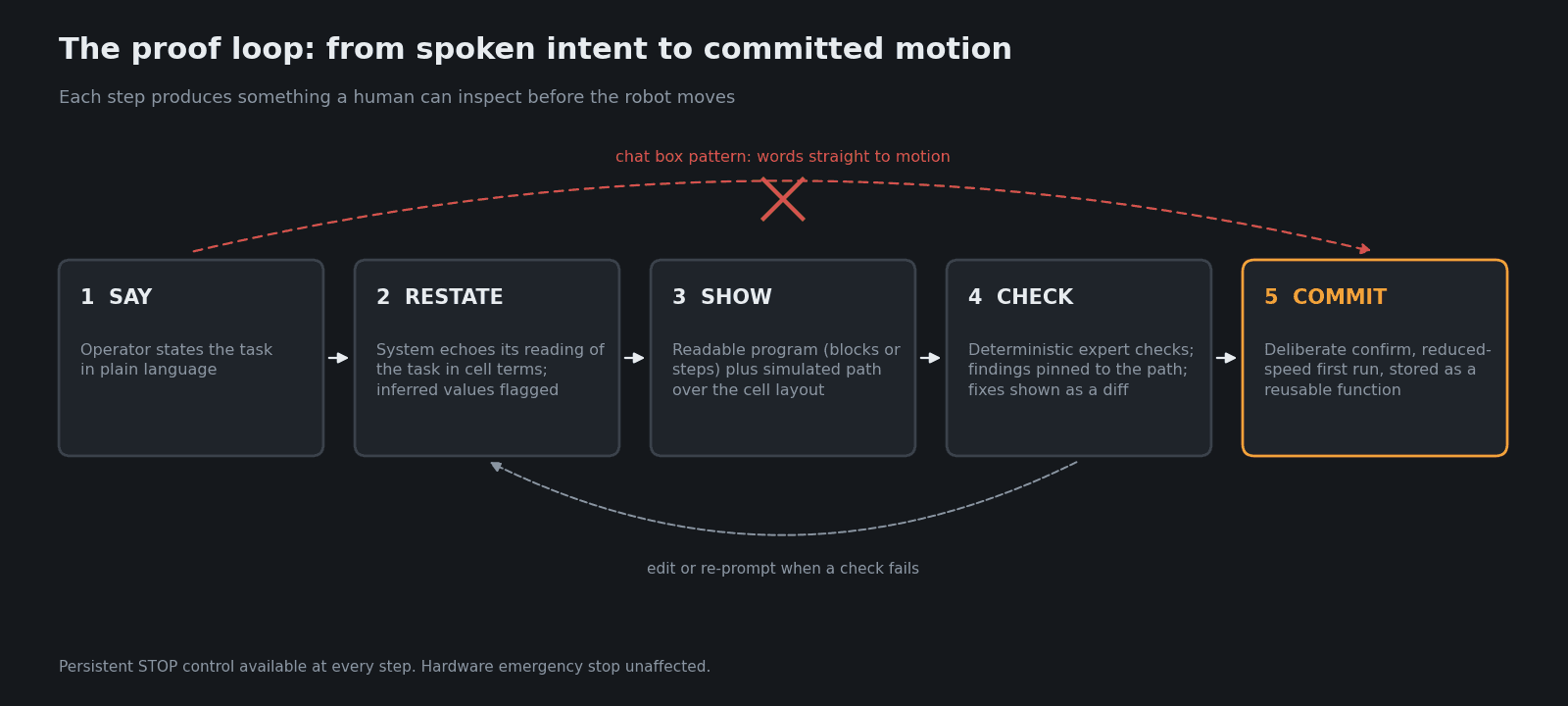
Figure 1: The proof loop. The operator's words never go straight to motion; every step produces something a human can inspect.
Why the chat box pattern fails on a robot
Three problems show up as soon as natural language meets a physical cell.
Language is vague by default. Operators say "keep clear of the fixture" or "put the small ones on the left." Those instructions hide preferences the robot has to guess. Researchers at MIT CSAIL presented work at ICRA 2026 in June on exactly this gap. Their method, Masked Inverse Reinforcement Learning, uses two language models: one elaborates on vague prompts using demonstration data, the other identifies which parts of the environment matter for the task and masks the rest. According to MIT, it used nearly five times less demonstration data and identified unstated user preferences up to 15 percent more often than comparable baselines. That is good progress. It also confirms the design point: the system is inferring things the operator never said, so the operator needs to see what was inferred.
Generated code is opaque. The RoboCritics paper from the University of Wisconsin-Madison, presented at HRI '26 in Edinburgh in March, states the problem directly: current LLM-based approaches "generate opaque, 'black-box' code that is difficult to verify or debug, creating tangible safety and reliability risks in physical systems." An operator who could not write the program in the first place is rarely in a position to audit it as code.
People stop checking. The same study recorded one participant, in the group that had the critics, describing how they treated the automated fixes: "I didn't really analyze it or take it in. Like, I was just being kind of lazy and just thinking like, well, if it fixed the code, it'll work, and if it didn't, I'll click these buttons and try and fix them again." That is one quote from one person, not a statistic. But anyone who has watched operators click through a confirmation dialog will recognise it. The EU AI Act even names the tendency: Article 14 asks that people overseeing high-risk AI systems be enabled "to remain aware of the possible tendency of automatically relying or over-relying on the output produced by a high-risk AI system (automation bias)."
Whether a given robot programming assistant counts as high-risk under the AI Act is a legal question for your compliance team, not a design one. But Article 14 reads like a decent UX brief regardless: understand the system's capacities and limitations, interpret its output correctly, override it, and interrupt it through "a 'stop' button or a similar procedure."
What the research prototypes get right
Two recent research systems show what a proof screen can look like in practice. Neither is a product, and I would not present them as validated industrial solutions. They are useful because they make the design choices explicit.
RoboCritics: expert checks, shown as feedback. The Wisconsin team connected a web-based interface to a UR3e and added five "expert-informed" critics that analyse the motion trace: space usage, collision, joint speed, end-effector pose and pinch points. When a critic detects a violation, the interface surfaces feedback and offers a one-click fix that sends a structured message back to the language model. In a between-subjects study with 18 participants, each program was scored by the five critics on a 0 to 10 program quality index. The critic group scored higher on all three tasks, with significant differences on the first two.
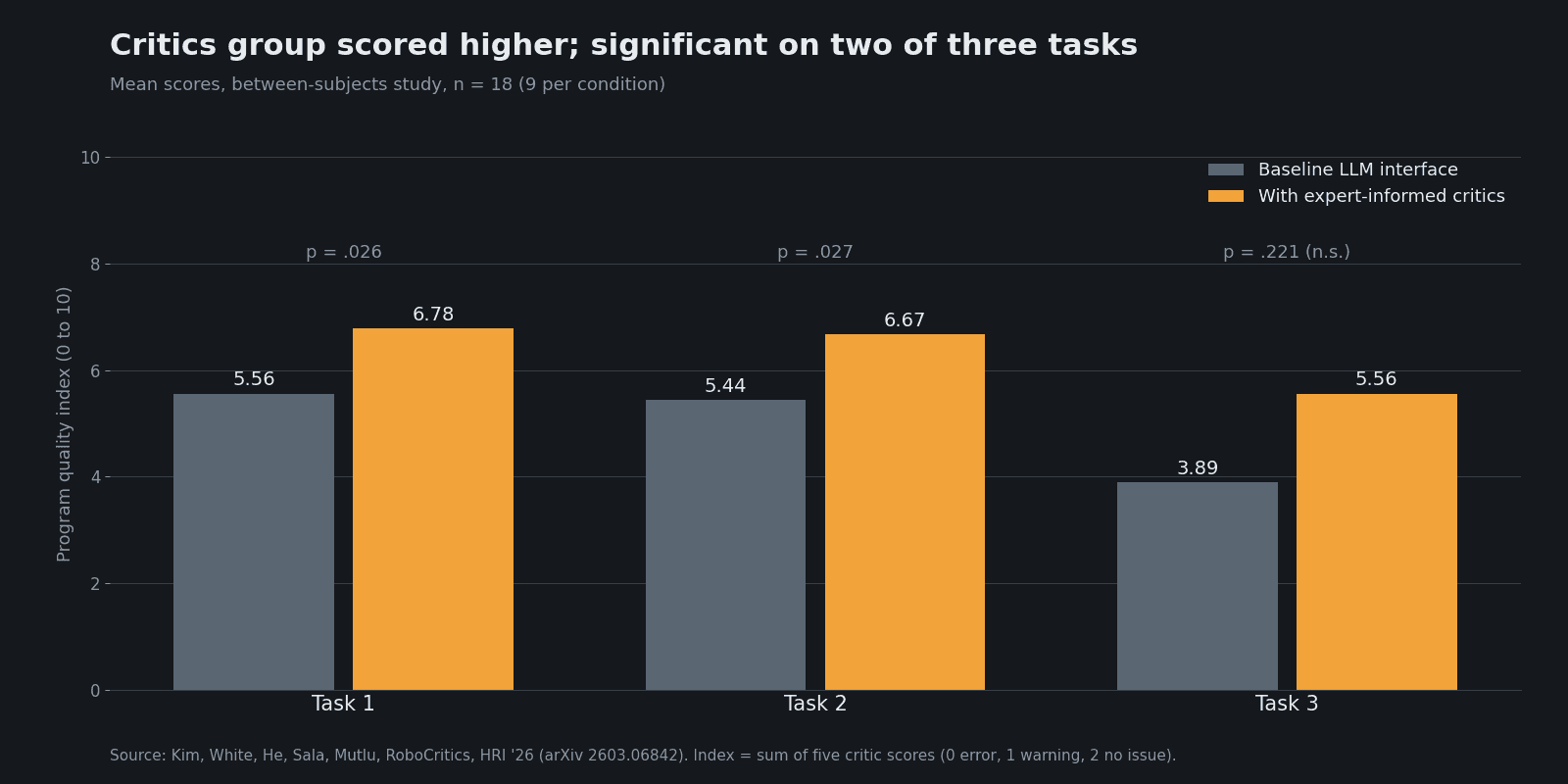
Figure 2: Mean program quality index (0 to 10) in the RoboCritics user study, n=18, between subjects. Tasks 1 and 2 significant (p=.026, p=.027); Task 3 not significant (p=.221). Source: Kim et al., RoboCritics, HRI '26.
The lesson for HMI designers is less about the numbers and more about the architecture. The language model proposes. Deterministic checks, written by people who know robots, dispose. The interface's job is to put the checks' verdicts in front of the operator in plain terms, next to the thing they refer to.
APPROVE: make the program visible before it runs. A paper posted to arXiv on 19 August 2026 by Kavousian and colleagues, accepted for the CIRP ICME 2026 conference, takes a different route. Natural language input generates a program, which is visualised as Blockly blocks so the user can confirm, modify or reject it before execution. Confirmed functions go into a library: "Confirmed functions are stored in a library for reuse, gradually building a set of reliable program components."
That last idea is the one I would steal first. It turns every confirmation into an asset. The second time an operator asks for a pick sequence, the system should reuse the function a human already approved rather than generate a fresh one.
Anatomy of a proof screen
Here is how I would lay out the screen that sits between intent and motion. It borrows from both papers and from Microsoft's 18 Guidelines for Human-AI Interaction (Amershi et al., CHI 2019), which were evaluated with 49 design practitioners against 20 AI-infused products. Four of those guidelines map almost directly onto robot programming: G1 "Make clear what the system can do", G2 "Make clear how well the system can do what it can do", G9 "Support efficient correction" and G11 "Make clear why the system did what it did."
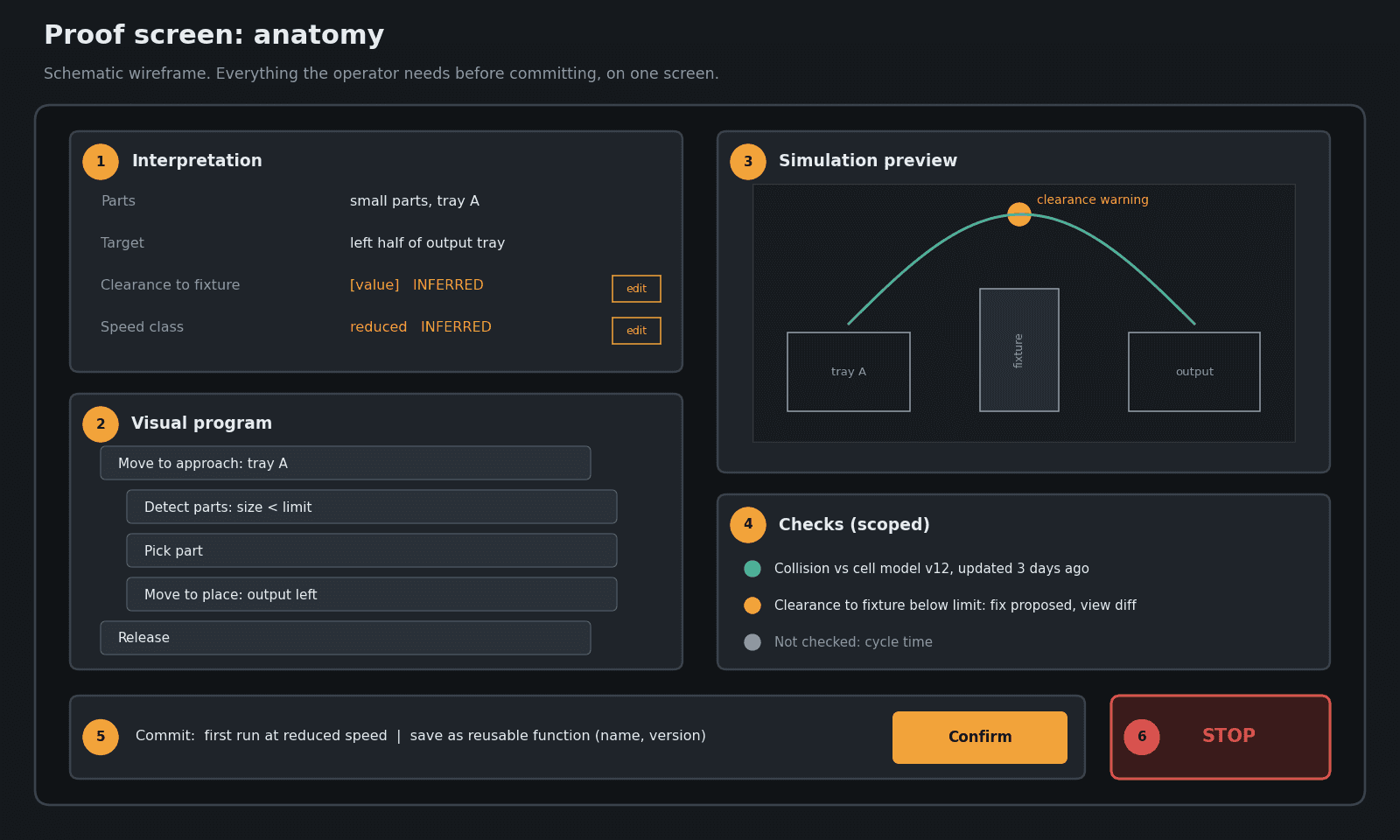
Figure 3: Proof screen wireframe. Interpretation and program on the left, simulation and checks on the right, commitment and stop always in the same place.
1. Interpretation panel (G11). Before any code, restate the instruction in cell vocabulary: which parts, which fixture, which target positions, which speed class, which zones to avoid. If the system inferred a preference the operator did not state, mark it as inferred. "Keep clear of the fixture" becomes "Minimum clearance to Fixture A: [value], inferred from your instruction. Change?"
2. Visual program (G9). Show the program in a form the operator can read and edit: blocks, a step list, or the vendor's own graphical programming view. The APPROVE approach of rendering generated code into blocks is the right instinct. Editing a block should be faster than re-prompting.
3. Simulation preview. With the major vendors building NVIDIA simulation into their virtual commissioning tools, a trajectory preview inside the programming flow becomes a realistic expectation. Show the path over the cell layout, with the checks' findings pinned to the exact point on the path where they occur.
4. Checks list (G2). List what was verified and what was not. A green tick for "collision check against the current cell model" is only honest if the cell model is current. Show the model's date. Never show a blanket "safe" badge.
5. Commit bar. Commit is a deliberate act: a distinct control, not the Enter key. Default the first run to reduced speed. Store the confirmed program as a reusable function in a library, as APPROVE does. I would add a clear name and a version number.
6. Stop. Visible on every state of the screen, same position, same size. This is a software control on top of the hardware emergency stop, never a replacement for it.
A checklist for your next natural-language feature
If you are designing or reviewing an AI programming feature for a robot HMI, run it against these questions:
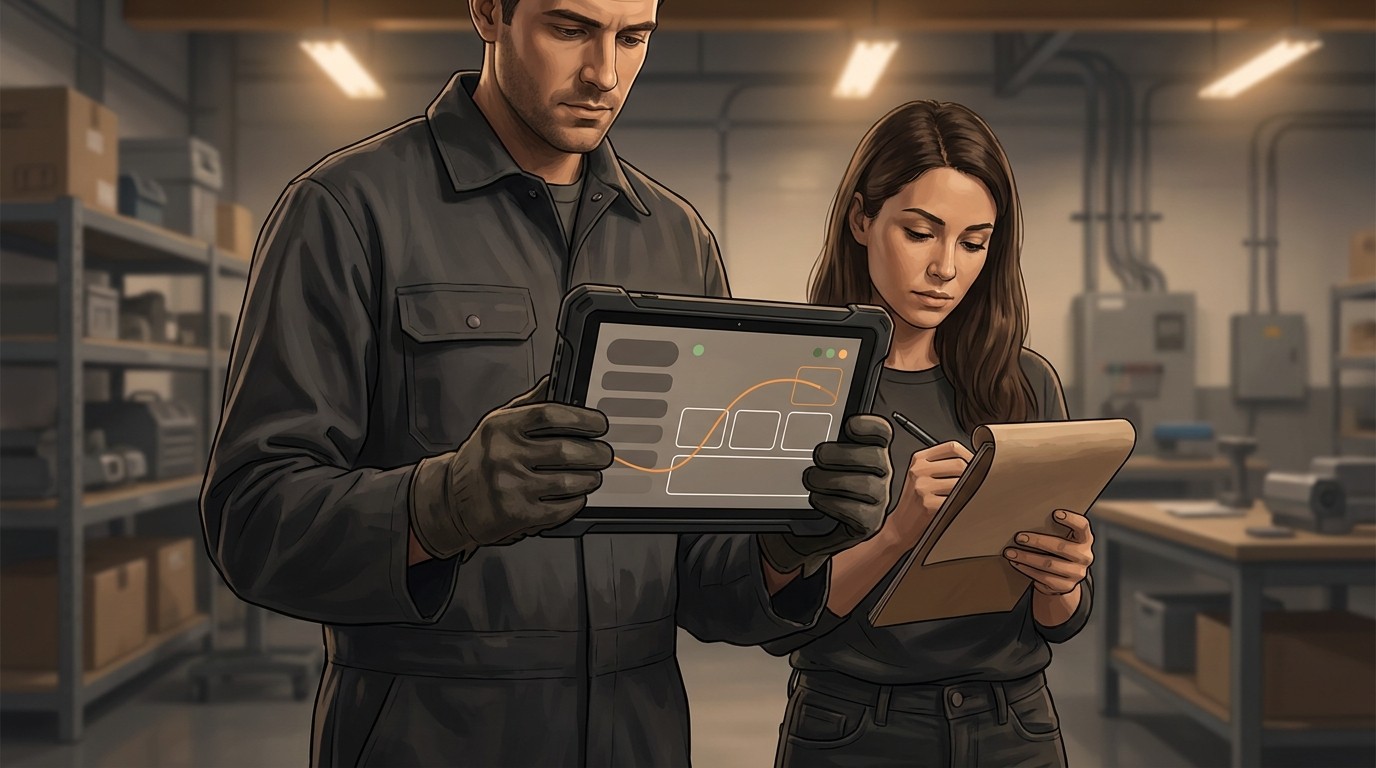
Figure 4: Test the proof screen where it will be used, with the people who will use it. AI-generated illustration.
Does the system restate the task before generating motion? If the first visible output is robot movement, the design has failed.
Are inferred values marked as inferred? Speeds, clearances and target positions the operator never stated need a visual flag and a one-tap edit.
Can a non-programmer read the generated program? If not, render it as blocks or steps. Raw code is for the integrator view.
Who wrote the checks? Verification should come from deterministic rules written by robotics people, not from the same model grading its own work.
Is every check scoped? "No collisions detected against cell model v12 (updated 3 days ago)" beats "No collisions."
Is a one-click fix also a one-click review? After an automatic fix, show the diff: what changed, and why. This is your main defence against the "if it fixed the code, it'll work" reflex.
Is commit a deliberate act? Separate control, reduced first-run speed, and a clear record of who approved what.
Do approved programs become reusable components? Every confirmation should reduce future generation, not just unlock one run.
Is the stop control always in the same place? Test it in every state, including while the model is still generating.
Have you tested it with operators, not just engineers? The audience for natural-language programming is people without robotics expertise. Test with them, at the cell, with gloves on if that is how they work.
Where this leaves designers
I do not think natural-language programming is hype. Research like MIT's Masked IRL is closing the gap between what people say and what they mean, and vendors are clearly building toward it. But the value of this capability will be decided by the interface that sits after the prompt, not by the prompt itself.
The Automate team wrote in January that trust "isn't built by removing humans from the process. It's built by giving humans better tools and keeping them informed." I agree, and I would make it concrete: the better tool is the proof screen. If your roadmap has a line item for "add natural language input" and no line item for the interpretation panel, the checks list and the commit flow, you are shipping the easy half.
Design the proof screen first. Then add the chat box.
Sources
ABB, "Key Cobot Trends Shaping 2026", 12 Feb 2026
https://new.abb.com/news/detail/133381/wbstr-key-cobot-trends-shaping-2026NVIDIA Newsroom, "NVIDIA and Global Robotics Leaders Take Physical AI to the Real World", 16 Mar 2026
https://nvidianews.nvidia.com/news/nvidia-and-global-robotics-leaders-take-physical-ai-to-the-real-worldMIT News, "LLMs help robots understand vague instructions and focus on key details", June 2026
https://news.mit.edu/2026/llms-help-robots-understand-vague-instructions-and-focus-key-details-0626Kim, White, He, Sala, Mutlu, "RoboCritics: Enabling Reliable End-to-End LLM Robot Programming through Expert-Informed Critics", HRI '26
https://arxiv.org/abs/2603.06842Kavousian, Özakkas, Monnet, Petrovic, Brecher, "APPROVE: Visual End-User-in-the-Loop Robot Programming with LLMs", arXiv, 19 Aug 2026
https://arxiv.org/abs/2608.19281EU AI Act, Article 14 (Human oversight)
https://artificialintelligenceact.eu/article/14/Amershi et al., "Guidelines for Human-AI Interaction", CHI 2019
https://www.microsoft.com/en-us/research/publication/guidelines-for-human-ai-interaction/Microsoft HAX Toolkit, Guidelines library
https://www.microsoft.com/en-us/haxtoolkit/library/Automate, "Navigating the Era of Industrial Copilots in Manufacturing", 14 Jan 2026
https://www.automateshow.com/blog/navigating-the-era-of-industrial-copilots-in-manufacturing